The version numbers here are outdated! Ignore them! 1.21.8 is the correct number!
Marmark-Craft 2.0
1.21.8 Update guide
The Marmark-Craft server has been updated to Minecraft 1.21.8! This means YOU will need to update your game as well. Below you will find a guide on how to do this.
What you will need:
-
A new Forge launcher
-
A set of new mod files for minimap, falling trees and worldmap.
All of these can be downloaded HERE!
==================================================
Installation:
1. Install new Forge mod to Minecraft.
2. Add submods to 'mods' folder.
3. Connect to Server
--------------------------------------------------
Step-by-step:
1. - Download the .zip file I have linked above.
2. - Extract both the file named 'forge-1.21.8-58.0.5-installer.jar' and the folder named 'mods'.
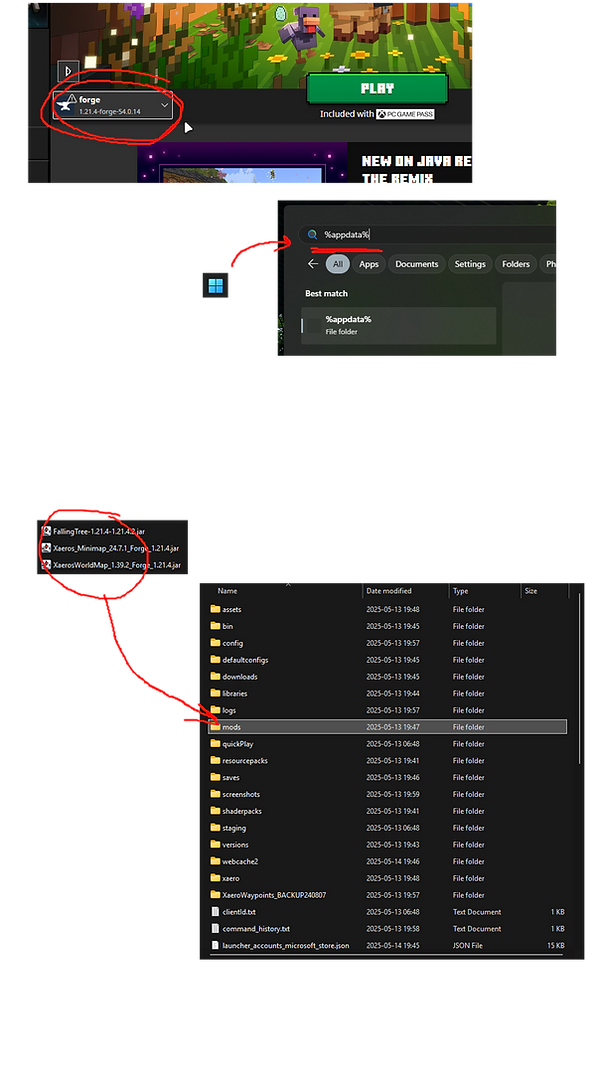
3. - Double click on the file. Follow the steps in the installer until it tells you it is done. Start Minecraft and check if you have a launcher with the new version number.
4. - On your PC, navigate to your minecraft folder. Remove the old mods you have and replace them with the ones found in the mods folder in the new files you just downloaded.
Can't find your Minecraft files? Do this:
4.1 - Navigate to your Minecraft folder by clicking on your Windows start button and typing in %appdata% and pressing enter. You want to navigate to this path: C:\Users\YOURNAME\AppData\Roaming\.minecraft\mods. Place all files in 'MODS' into C:\Users\[NAME]\AppData\Roaming\.minecraft\mods.
Now you can connect to the server with the same IP as before: 62.119.14.132:25565
--------------------------------------------------
For more information or if you have questions, please join the Discord Community page for this game server.
Thank you///


Request access, get help or get server passwords